

Full-Screen Welcome Screens: When to Use Them and What to Ask
Full-screen welcome screens can personalize onboarding before users hit your UI—if you keep them short, ask only what you’ll use immediately, and turn answers into better defaults, templates, and guidance. Here’s when they work, what to ask (and avoid), plus sample questions, compliance notes, and measurement tips.
 Noah H.Lifecycle Marketing Manager
Full-screen welcome screens (sometimes called “welcome modals” or “onboarding questionnaires”) sit between sign-up and your product UI. Done well, they reduce confusion and speed up time-to-value by setting the right defaults, templates, and guidance. Done poorly, they feel like a survey that blocks progress.
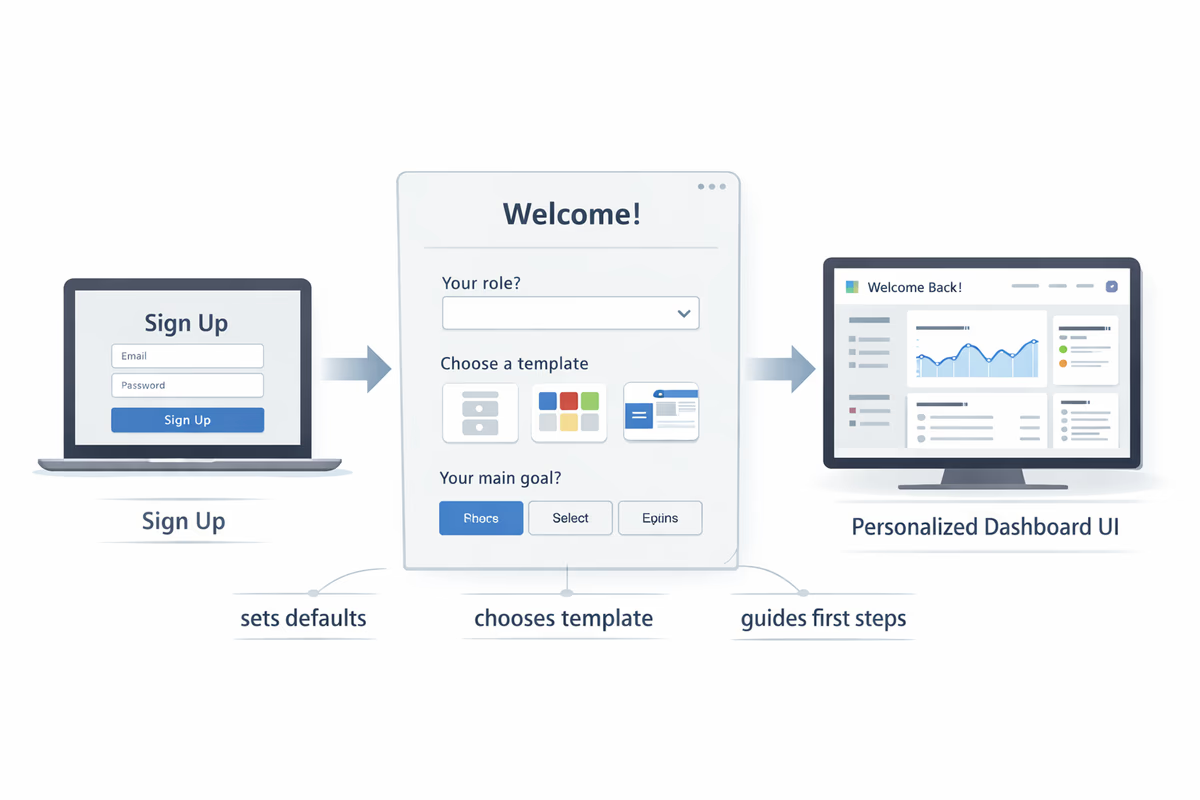
This guide covers when a full-screen welcome flow is worth the friction, what to ask (and what to avoid), how to use answers immediately, and how to measure whether it’s helping.
When full-screen welcome screens are the right move
Use a full-screen welcome screen when you have high variation in user intent and the “wrong” first experience creates real confusion.
Good fits
- Multi-persona products: Different roles need different starting points (e.g., Admin vs. Analyst vs. Contributor).
- Multiple jobs-to-be-done: Users come for distinct outcomes (e.g., “track NPS” vs. “run onboarding tours” vs. “analyze funnels”).
- Complex setup paths: The first steps depend on context (data source, team size, integration, workflow).
- Template-first products: You can instantly tailor the workspace by selecting a use case.
- High-stakes first session: Free trials where the first 10 minutes decide whether users explore or bounce.
When to avoid them
- Single-path products: If nearly everyone should do the same first action, don’t block the UI.
- Low-friction, self-serve tools: If users can understand value in one click, a full-screen step slows them down.
- You can’t act on the answers immediately: If the data only goes into a CRM “for later,” users will feel the tax.
A simple rule: if your welcome screen doesn’t change what the user sees or can do in the next 60 seconds, it’s probably not worth it.
The goal: personalize the first session, not collect demographics
A welcome screen should do one (or more) of these jobs:
- Set defaults (workspace settings, recommended features, navigation shortcuts)
- Pick the right starting template (project template, dashboard, checklist)
- Route guidance (different tours, tooltips, checklists, or empty-state copy)
- Reduce setup steps (skip irrelevant prompts, preselect integrations)
If a question doesn’t map to one of those outcomes, cut it.
What to ask (the high-signal questions)
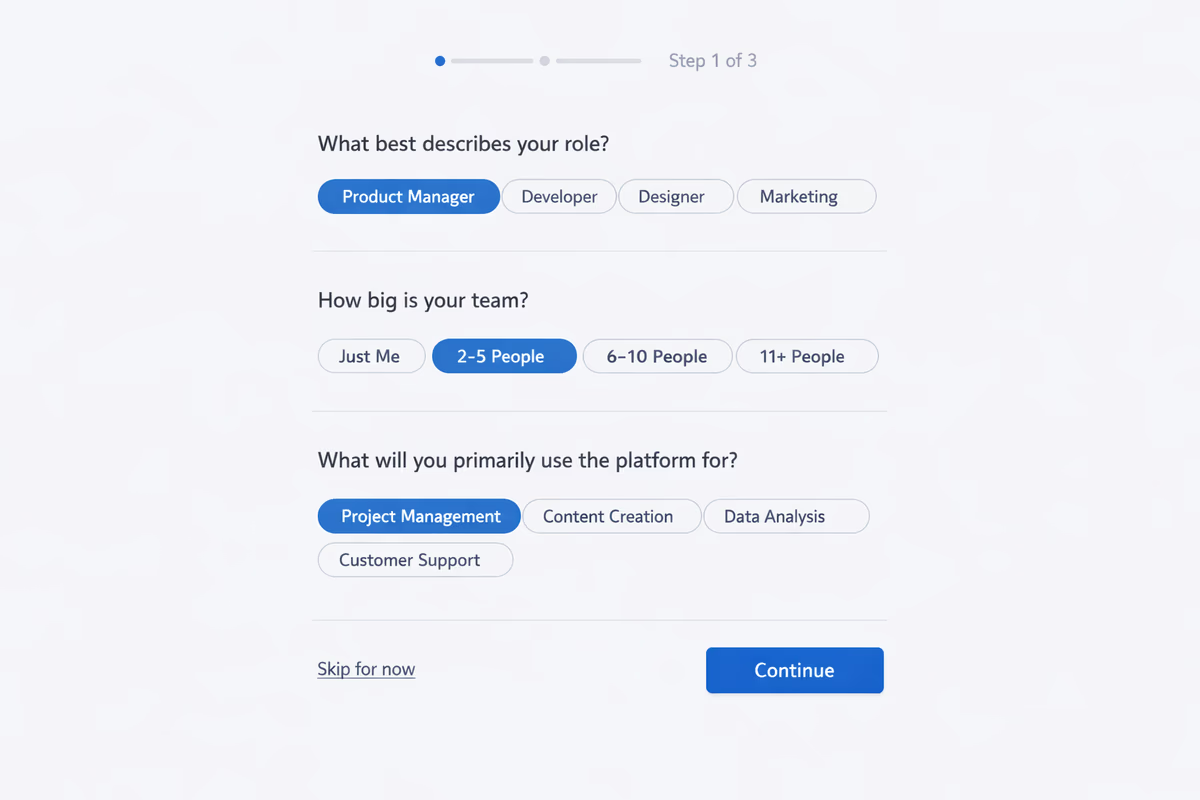
Aim for 1–3 questions in the first screen. You can always collect more later via progressive profiling.
1) Role (persona)
Why it’s useful: Role is often the strongest predictor of what “success” looks like and which UI paths matter.
Best formats: single-select buttons.
Example options:
- Product Manager
- Growth/Marketing
- Customer Success
- Engineering
- Founder/Executive
- Other
How to use it immediately:
- Default the onboarding checklist to role-specific tasks
- Tailor empty states (“Create your first tour” vs. “Install the snippet”)
- Show relevant templates first
2) Primary goal (job-to-be-done)
Why it’s useful: Goal-based onboarding typically outperforms feature-based onboarding because it matches intent.
Best formats: single-select, 3–5 options max.
Example options:
- Improve activation in the first session
- Launch in-app onboarding tours
- Reduce support tickets with guidance
- Track feature adoption
- Set up analytics and funnels
How to use it immediately:
- Preload the best template/checklist
- Route the user to the right “first value” screen
- Trigger the right in-app walkthrough
3) Team size (or company stage)
Why it’s useful: Team size is a proxy for complexity (permissions, collaboration, approvals, security requirements).
Best formats: ranges.
Example options:
- Just me
- 2–10
- 11–50
- 51–200
- 200+
How to use it immediately:
- Offer “solo quick start” vs. “team rollout” onboarding
- Suggest inviting teammates at the right time (not immediately for solo)
- Adjust recommended governance settings
4) Use case / workflow (template selector)
Why it’s useful: If your product supports multiple workflows, use-case selection can instantly create a “ready-to-go” workspace.
Best formats: cards with a one-line description.
Example options:
- New user onboarding
- Feature announcements
- In-app surveys/feedback
- Help center + contextual guidance
- Experimentation and A/B testing
How to use it immediately:
- Create the first project with the chosen template
- Set default events, segments, or funnels
- Pin the most relevant navigation items
5) Technical context (only if it changes setup)
Ask this only when it changes the next steps.
Examples:
- “How will you install?” (JavaScript snippet, Segment, GTM)
- “Which platform?” (Web app, iOS, Android)
How to use it immediately:
- Show the correct install instructions
- Pre-filter docs and in-app prompts
What to avoid asking (and why)
Anything that feels like lead qualification
Avoid questions like:
- “What’s your budget?”
- “When are you planning to purchase?”
- “Phone number” (unless required for account security)
These reduce trust and increase drop-off, especially in self-serve trials.
Open-ended questions in the first screen
“What are you hoping to achieve?” sounds friendly but creates work. If you want qualitative input, ask later after the user has seen value.
Too many questions at once
A full-screen welcome flow is a conversion funnel step. Treat every additional field as friction. If you need 8 data points, you need progressive profiling.
Progressive profiling: collect more without blocking value
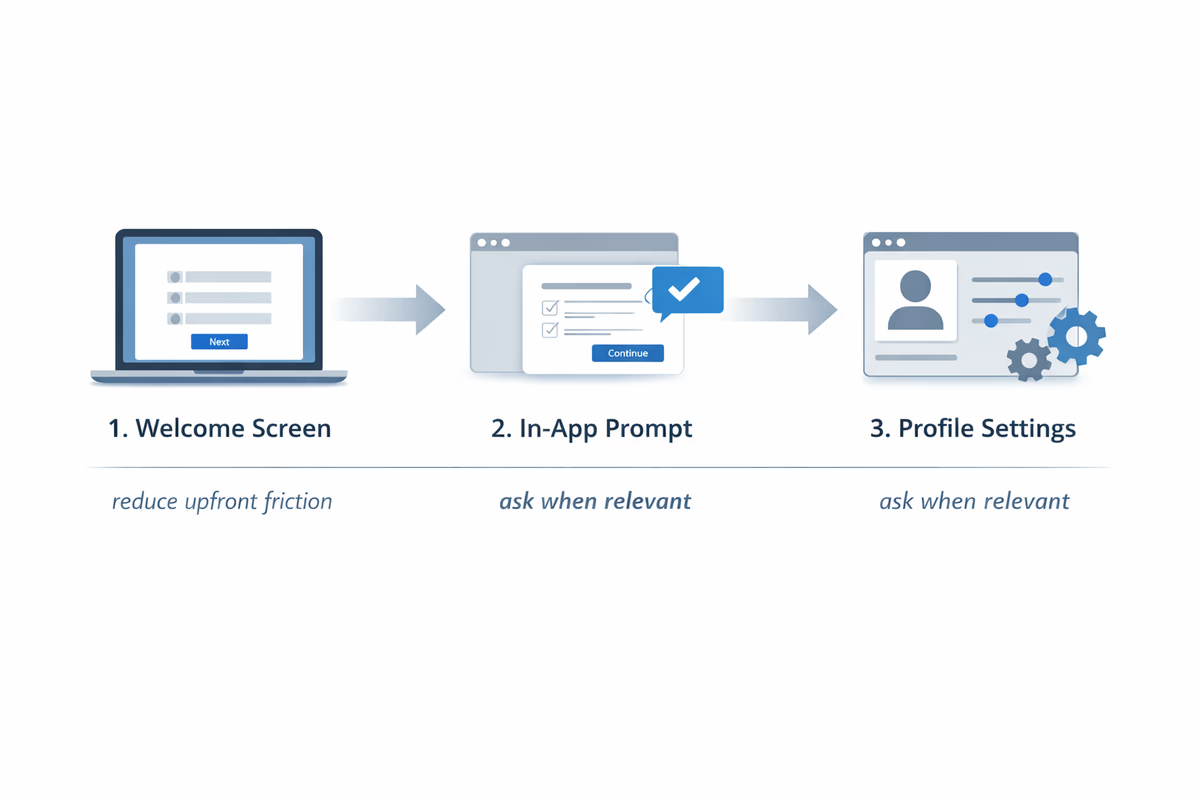
Progressive profiling means you ask the minimum upfront, then gather the rest when it’s contextually relevant.
A practical sequence
- Welcome screen (1–3 questions): role + goal (and optionally team size)
- After first success moment: ask one additional question that improves next steps (e.g., platform or install method)
- Before advanced features: ask only what unlocks that feature (permissions model, data source, etc.)
Where to place follow-up questions
- In an onboarding checklist step (“Tell us your platform to get the right install guide”)
- In a setup wizard (only when required)
- In empty states (when the user tries to create something)
The key is timing: ask when the user understands why you’re asking.
Copy and UX patterns that reduce friction
Make the value exchange explicit
Instead of “Answer a few questions,” use:
- “Help us tailor your workspace (30 seconds).”
- “Pick your goal—we’ll set up the best checklist for you.”
Keep it skimmable
- Use buttons/cards (avoid long forms)
- Limit to 3–5 options per question
- Use short helper text (one line)
Always include a skip path (when possible)
If you can’t support skip, keep the flow extremely short. If you can support skip, label it clearly:
- “Skip for now”
Then provide a way to set preferences later in settings.
Don’t reset users who go back
If they hit back, preserve selections. Losing input is a fast way to create rage clicks.
Compliance and privacy considerations (practical, not legal advice)
Welcome screens often collect personal data or data that becomes personal when combined.
- Data minimization: collect only what you need for onboarding.
- Purpose limitation: don’t reuse onboarding answers for unrelated marketing without the right consent.
- Transparency: link to privacy policy and add a short line like “Used to personalize your setup.”
- Sensitive categories: avoid collecting anything that could be considered sensitive (health, ethnicity, etc.).
- Retention: if you don’t need it long-term, don’t store it long-term.
If you operate in regulated environments, coordinate with legal on what’s required for GDPR/CCPA and internal policies.
How to turn answers into a better product experience
A welcome screen is only as good as what it triggers.
Map each answer to an action
Create a simple mapping table:
- Role → default dashboard, recommended checklist, tooltip set
- Goal → first project template, success metric, guided tour path
- Team size → invite teammate prompt timing, permission defaults
- Platform/install method → correct setup steps, docs links, SDK prompts
If you can’t define an action for an answer, remove the question.
Personalize without over-personalizing
Users want relevance, not creepiness. Prefer:
- “Here’s a checklist for Product Managers”
Over:
- “We noticed you’re a Product Manager at a 51–200 person company…”
Measuring whether your welcome flow helps or hurts
Treat the welcome screen like an experiment.
Core metrics
- Welcome completion rate: % who finish the welcome flow
- Drop-off rate: % who abandon during welcome
- Time to first value (TTV): time from signup to key activation event
- Activation rate: % who hit your activation milestone within X days
- Downstream conversion: trial-to-paid or demo request rate (if applicable)
Behavioral diagnostics
- Compare activation for users who completed vs. skipped (if skip exists)
- Segment by role/goal to see which paths underperform
- Watch for “false completion”: users finish welcome but don’t take next action
A/B tests worth running
- 1 question vs. 2–3 questions
- Role-first vs. goal-first ordering
- Template picker vs. no template picker
- With skip vs. without skip
Your success criteria should be downstream (activation/TTV), not just “more data collected.”
Sample welcome screen questions (copy you can adapt)
Option A: The minimalist (best for most products)
Headline: “Let’s tailor your setup”
- “What best describes your role?” (single select)
- “What’s your main goal today?” (single select)
Button: “Continue” Secondary: “Skip for now”
Option B: Template-first (best when templates drive value)
Headline: “Choose a starting point”
- “What are you building?” (template cards)
- “New user onboarding”
- “Feature announcements”
- “In-app guidance”
- “Feedback collection”
Button: “Create my workspace”
Option C: Setup routing (best when install paths differ)
Headline: “Quick setup”
- “Where will you use [product]?” (Web / iOS / Android)
- “How will you install?” (Snippet / Segment / GTM)
Button: “Show my setup steps”
Implementation checklist
- Keep the first screen to 1–3 questions
- Ensure every question triggers an immediate personalization action
- Use single-select inputs wherever possible
- Provide skip if you can support a generic path
- Add progressive profiling prompts after the first success moment
- Instrument events for each step (view, answer, submit, skip, abandon)
- Measure impact on activation rate and time-to-value, not just completion
Full-screen welcome screens are powerful because they let you personalize before users see your UI. But they only earn their place when they reduce work for the user right now—not when they increase work to benefit you later.
FAQ
How many questions should a full-screen welcome screen include?
Usually 1–3. Start with role and primary goal. Add a third question (like team size or platform) only if it changes the next steps immediately. Collect anything else later via progressive profiling.
Should I allow users to skip the welcome screen?
If your product can still deliver a solid default experience, yes—offer “Skip for now” and let users set preferences later. If skipping would break setup or create a confusing UI, keep the flow unskippable but extremely short.
What’s the best way to measure whether the welcome flow is working?
Track completion and drop-off, but judge success by downstream outcomes: time-to-first-value and activation rate. Run an A/B test comparing welcome flow variants and confirm the winning version improves activation without increasing abandonment.
What questions should I avoid asking on a welcome screen?
Avoid anything that feels like lead qualification (budget, purchase timeline, phone number), long open-ended questions, and questions you won’t use immediately to personalize onboarding. These increase friction and reduce trust.
Table of Contents
- When full-screen welcome screens are the right move
- Good fits
- When to avoid them
- The goal: personalize the first session, not collect demographics
- What to ask (the high-signal questions)
- 1) Role (persona)
- 2) Primary goal (job-to-be-done)
- 3) Team size (or company stage)
- 4) Use case / workflow (template selector)
- 5) Technical context (only if it changes setup)
- What to avoid asking (and why)
- Anything that feels like lead qualification
- Open-ended questions in the first screen
- Too many questions at once
- Progressive profiling: collect more without blocking value
- A practical sequence
- Where to place follow-up questions
- Copy and UX patterns that reduce friction
- Make the value exchange explicit
- Keep it skimmable
- Always include a skip path (when possible)
- Don’t reset users who go back
- Compliance and privacy considerations (practical, not legal advice)
- How to turn answers into a better product experience
- Map each answer to an action
- Personalize without over-personalizing
- Measuring whether your welcome flow helps or hurts
- Core metrics
- Behavioral diagnostics
- A/B tests worth running
- Sample welcome screen questions (copy you can adapt)
- Option A: The minimalist (best for most products)
- Option B: Template-first (best when templates drive value)
- Option C: Setup routing (best when install paths differ)
- Implementation checklist