

The Activation Blueprint for B2B SaaS: From Signup to First Value
Activation isn’t a vibe—it’s a path. Learn how to define your “first value” moment, pick 3–5 activation milestones, and align in-app guidance and analytics to move users from signup to a meaningful outcome fast. Includes a reusable worksheet for any persona, feature, or tier.
 Olivia T.Product Education Lead
Activation isn’t “users felt good about the product.” Activation is the shortest reliable path from signup to first value—a measurable moment when a new user gets a meaningful outcome and is more likely to return.
If activation is low, everything downstream suffers: trial conversion, feature adoption, and retention. The fix is rarely “add more onboarding.” It’s usually clarify the first value moment, remove steps, and guide users through the few actions that matter.
This is a practical blueprint you can apply to any B2B SaaS product, plus a worksheet you can reuse for new personas, features, and tiers.
Step 1: Define “first value” (not “first click”)
Your first value moment (FVM) is the earliest point where a user experiences a real outcome aligned with your product’s promise.
What first value is
- A user completes a key job-to-be-done and sees a result
- It’s measurable in product analytics
- It predicts retention or expansion better than vanity actions
What first value is not
- “Visited the dashboard”
- “Clicked around”
- “Watched a tour”
- “Created an account”
How to find your first value moment
Use these three inputs:
- Retention correlation: Which early behaviors correlate with week-4 retention or paid conversion?
- Customer interviews: Ask recent converts: “When did you realize this was worth paying for?”
- Support/sales notes: Look for repeated phrases like “Once we connected X…” or “After we invited Y…”
Examples of solid FVMs (B2B):
- CRM: first deal created + email sync enabled + first follow-up sent
- Analytics: first data source connected + first report shared
- Collaboration: first workspace created + teammate invited + first task completed
- Security: first policy applied + first alert resolved
Step 2: Map the shortest path from signup to first value
Once you know the destination, map the path. The goal is not to document every possible journey. It’s to define the minimum set of steps that reliably produce first value for a specific persona.
Build your activation path map
For one persona (start with your highest-volume or highest-value segment), answer:
- What do they want to accomplish in the first session?
- What must be true in the product for them to get that outcome?
- Which steps are required vs. optional?
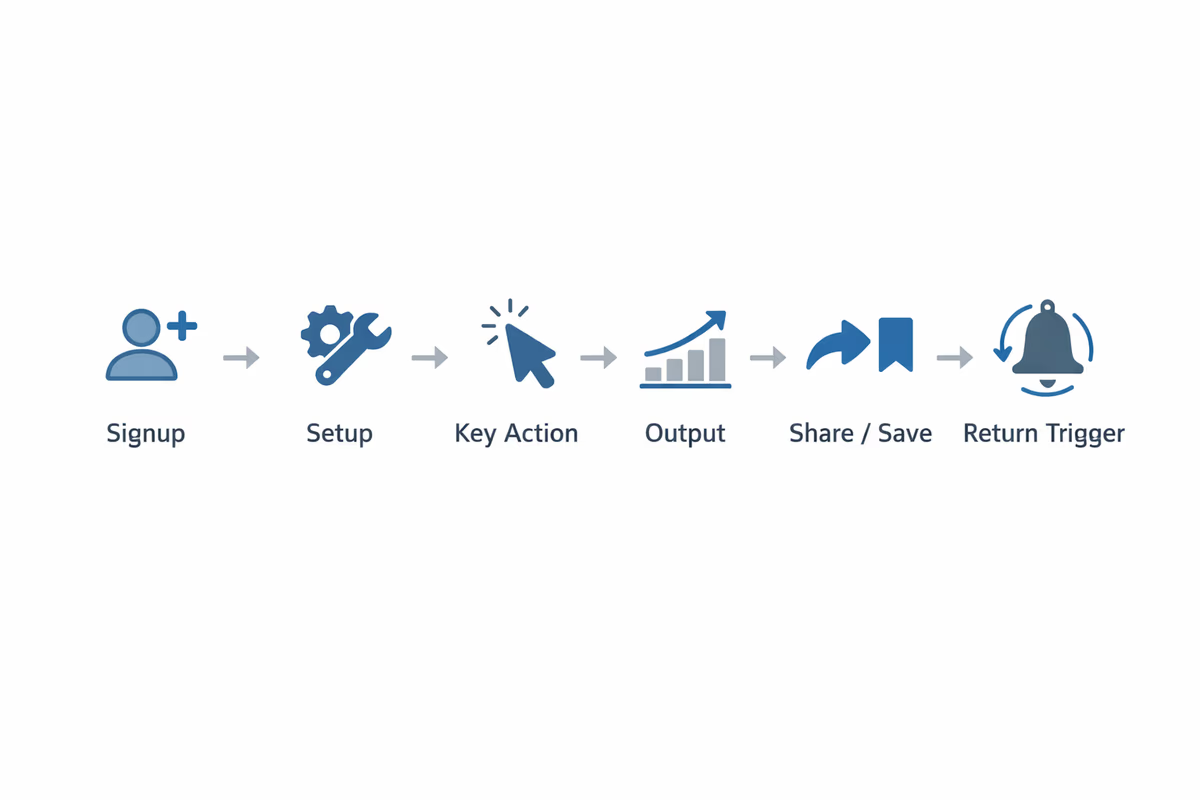
Then draw a simple sequence: Signup → Setup → Key action → Output → Share/Save → Return trigger
Reduce steps aggressively
Every step you keep must earn its place.
- Remove fields from signup (collect later)
- Delay non-essential configuration
- Use defaults and templates
- Auto-create a sample project/workspace when it helps users understand the end state
A useful test: if a step fails, does the user still have a path to value? If not, the step is critical and needs extra support.
Step 3: Choose 3–5 activation milestones (your “activation ladder”)
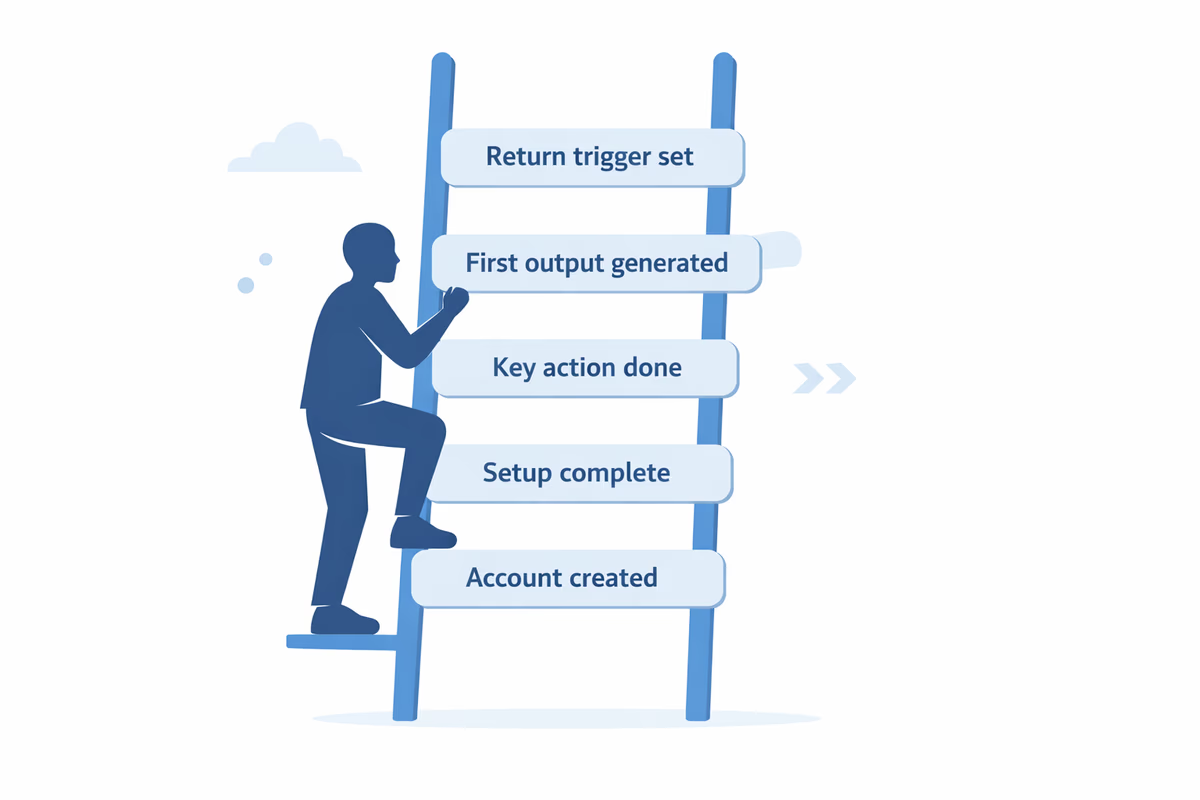
Your activation ladder is a small set of milestones that move a user from “new” to “activated.” Keep it tight: 3–5 milestones is enough to guide design and measurement without creating noise.
What makes a good milestone
- It’s a user action (or system state change) that moves them closer to FVM
- It’s trackable as an event
- It’s specific (not “engaged”)
- It’s reasonably achievable in the first 1–3 sessions
Example activation ladder (generic)
- Account created (baseline)
- Core object created (project/workspace/report)
- Required integration connected (data source, email, calendar)
- First meaningful output generated (report, automation run, alert, share)
- Collaboration or repeat intent (invite teammate, schedule, save, set automation)
Not every product needs collaboration as a milestone. Use the ladder that best predicts retention for your product.
Step 4: Design onboarding to remove friction at each milestone
Now you can design onboarding as a set of targeted interventions—not a long product tour.
Think in terms of: prompt → action → confirmation → next best step.
Milestone-by-milestone onboarding tactics
1) From signup to “first setup”
Goal: get users into the product fast with clarity.
- Keep signup minimal
- Ask 1–2 segmentation questions only if they change the experience (role, goal, company size)
- Route users to a relevant starting point (template, use case, or default workspace)
2) From setup to “core object created”
Goal: remove blank-state confusion.
- Use a checklist with 3–5 items (your activation ladder)
- Provide a template gallery or pre-filled example
- Use inline tooltips only where users hesitate (avoid tooltip spam)
3) From core object to “integration connected” (if required)
Goal: make the integration feel safe and worth it.
- Explain the benefit in one sentence (not features)
- Show what will happen after connecting (preview output)
- Offer a fallback path (upload CSV, use sample data) so users can still reach value
4) From integration to “first output”
Goal: deliver the “aha” fast.
- Add a guided action that produces a visible result (generate report, run automation)
- Use progressive disclosure: show only the fields required to run the first output
- Confirm success with a clear outcome message (what changed, where to find it)
5) From first output to “return trigger”
Goal: create a reason to come back.
- Encourage saving, scheduling, or setting an alert
- Suggest inviting a teammate if it increases stickiness
- Trigger a lightweight email or in-app reminder tied to the output (not generic nurture)
Choose the right UI pattern for the job
- Checklists: best for multi-step activation ladders
- Tooltips: best for single-field nudges at the moment of need
- Modals: best for high-importance decisions (choose goal/template), use sparingly
- Interactive walkthroughs: best when users must complete a sequence in one flow
The rule: guidance should appear where the decision is made, not in a separate “tour.”
Step 5: Instrument analytics around milestones (so you can fix drop-offs)
If you can’t see where users get stuck, you can’t improve activation.
Track these events
At minimum, instrument:
- Each milestone completion event (e.g.,
workspace_created,integration_connected,report_generated) - Key failure events (integration error, permission denied)
- Time stamps for time-to-value analysis
Build an activation funnel
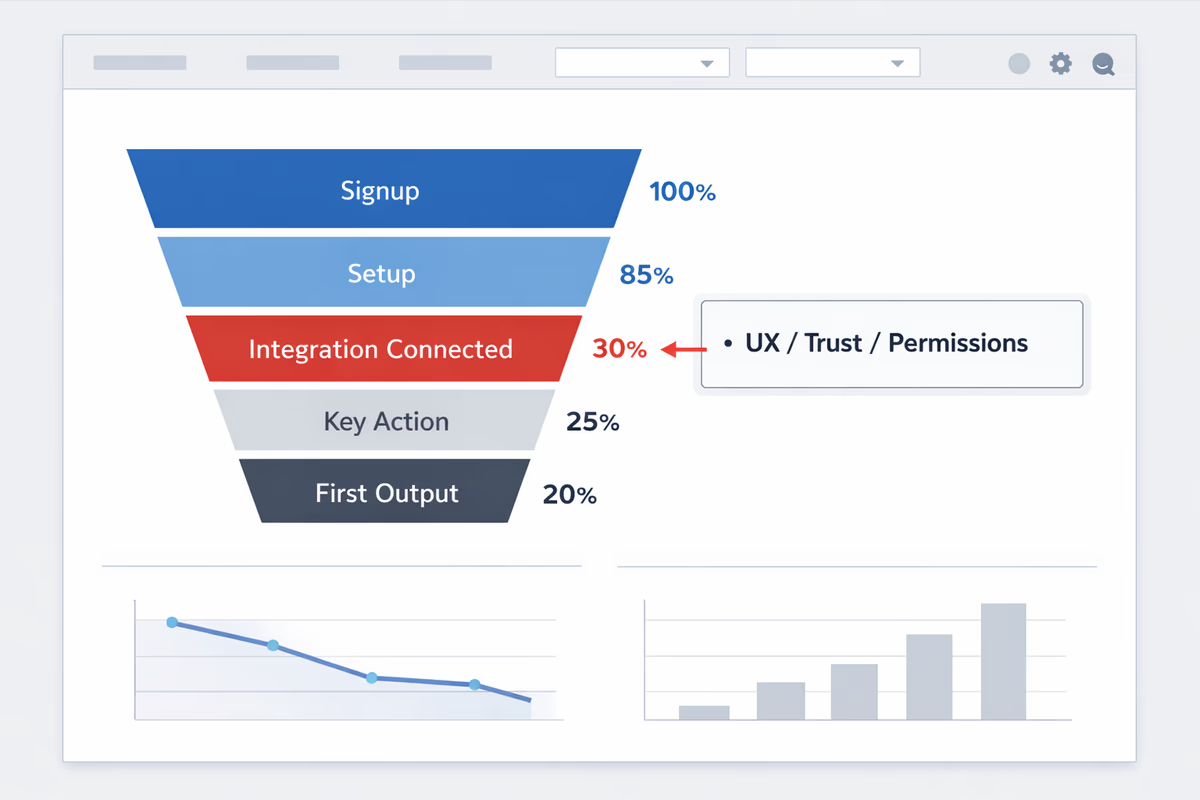
Create a funnel that mirrors your activation ladder. Then segment it by:
- Persona/role
- Acquisition channel
- Company size
- Trial vs. freemium
- Device/browser (for technical friction)
Metrics that matter
- Activation rate: % of signups reaching FVM within a defined window (e.g., 7 days)
- Time to first value (TTV): median time from signup to FVM
- Step conversion: % moving from milestone N to N+1
- Drop-off reasons: top error states or abandonment points
Use these to prioritize fixes. If 70% drop at “integration connected,” that’s not an onboarding copy problem—it’s an integration UX, trust, or permission problem.
Step 6: Run a tight activation improvement loop
Activation work should run like a product growth loop:
- Diagnose: identify the biggest drop-off step
- Hypothesize: why users fail there (friction, confusion, missing prerequisite)
- Intervene: add guidance, remove fields, add defaults, create a fallback path
- Measure: step conversion + TTV + activation rate
- Iterate: keep what moves metrics, remove what doesn’t
Practical prioritization
Start with changes that reduce friction without adding complexity:
- Remove optional steps before first value
- Improve empty states with templates
- Add one checklist tied to your milestones
- Add success confirmations and clear next steps
Avoid “more onboarding” as a default. Extra UI can increase cognitive load and reduce completion.
Activation worksheet (copy/paste for any persona, feature, or tier)
Use this worksheet to define a clean activation path.
1) Persona and job
- Persona:
- Primary job-to-be-done:
- Context (trial, paid, self-serve, sales-assisted):
2) First value moment (FVM)
- The user gets value when they:
- The value is visible as:
- Analytics event definition:
- Time window target (e.g., within 1 day / 7 days):
3) Activation ladder (3–5 milestones)
Milestone 1:
- Event name:
- Why it matters:
- Common friction:
- Guidance to add/remove:
Milestone 2:
- Event name:
- Why it matters:
- Common friction:
- Guidance to add/remove:
Milestone 3:
- Event name:
- Why it matters:
- Common friction:
- Guidance to add/remove:
Milestone 4 (optional):
- Event name:
- Why it matters:
- Common friction:
- Guidance to add/remove:
Milestone 5 (optional):
- Event name:
- Why it matters:
- Common friction:
- Guidance to add/remove:
4) Measurement plan
- Activation funnel steps:
- Primary metric: activation rate (% reaching FVM)
- Secondary metrics: TTV, step conversion, error rate
- Segments to compare:
5) Experiment plan
- Hypothesis:
- Change to ship:
- Success criteria:
- Rollback criteria:
What to implement first (a practical starter pack)
If you want a clean first iteration in 1–2 sprints:
- Define your FVM and 3–5 milestones for one core persona
- Add a checklist tied to those milestones
- Improve the empty state with one strong template
- Instrument milestone events and build an activation funnel
- Fix the biggest drop-off step before adding anything else
Activation becomes predictable when you treat it like a designed path with measurable steps. Once you can reliably move users to first value, you’ll see compounding improvements in trial conversion, retention, and expansion—because users aren’t just onboarded. They’re successful.
FAQ
How do I choose the right “first value” moment for a complex B2B product?
Pick the earliest outcome that proves your core promise for a specific persona, then validate it against retention or conversion. If multiple personas have different paths, define an FVM per persona and start with the highest-volume or highest-revenue segment.
How many activation milestones should we track?
Track 3–5 milestones. Fewer makes diagnosis hard; more creates noise and slows execution. Each milestone should be necessary to reach first value and measurable as a clear event.
What’s the difference between activation rate and time-to-value?
Activation rate measures how many users reach first value within a time window. Time-to-value measures how long it takes those users to get there. Improve both by removing steps, adding defaults, and guiding users through the highest-friction milestone.
Should we use product tours to improve activation?
Only if the tour is action-based and tied to milestones. Most “feature tours” don’t help because they show UI without producing outcomes. Prefer checklists, contextual tooltips, and guided flows that drive users to their next required action.
Table of Contents
- Step 1: Define “first value” (not “first click”)
- What first value is
- What first value is not
- How to find your first value moment
- Step 2: Map the shortest path from signup to first value
- Build your activation path map
- Reduce steps aggressively
- Step 3: Choose 3–5 activation milestones (your “activation ladder”)
- What makes a good milestone
- Example activation ladder (generic)
- Step 4: Design onboarding to remove friction at each milestone
- Milestone-by-milestone onboarding tactics
- Choose the right UI pattern for the job
- Step 5: Instrument analytics around milestones (so you can fix drop-offs)
- Track these events
- Build an activation funnel
- Metrics that matter
- Step 6: Run a tight activation improvement loop
- Practical prioritization
- Activation worksheet (copy/paste for any persona, feature, or tier)
- 1) Persona and job
- 2) First value moment (FVM)
- 3) Activation ladder (3–5 milestones)
- 4) Measurement plan
- 5) Experiment plan
- What to implement first (a practical starter pack)